Table Of Content
New in 2026
Quick Guide
Video Guides
Getting Started
UI Design
Var Actor
Edit Scene
Designer
Feat. w. Preview
Other Features
Modes
Blueprints
Cost Reports
Multi-Unit-Prj
Google Sheets
FAQ & Tips
Fix Bugs
Updating
Version History
UI Layout And Design
User Interface Layout and Design. Settings that affect the Interface design
- Colors
- Text Format
- Panel Size
Content:
 Documentation Archive 2025
Introduction
The interface or UI only shows up when the level is played (run-time). The settings for the interface can be modified in the Info Map blueprint that needs to be placed into the main level.There are 2 sections in the Info Map
- UI Panel Layout which defines where the menu panels and buttons are and the size of the panels.
- UI Panel Design is where the color, the text and the icons are defined.
Main Menu Data
The data table here contains the button and panel layout. This is where you can build and modify the menu.
The level with the info map needs to be saved to see a change. You can click the box for Update Data Table if Unreal refuses to show the changes.
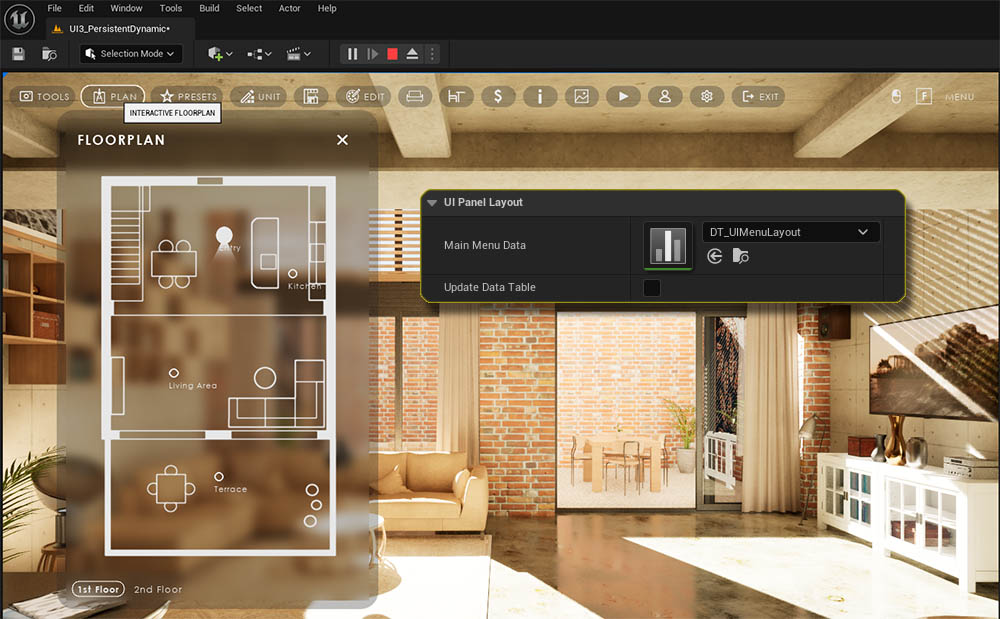
Main Menu Data
Every row in the data table is one button in the menu. The Row Name in a data table always needs to be unique but it is not used in the menu anywhere.Menu Name
The name of the button. Can be left blank. - Names can also be hidden for all menus.
Tool Tip
Tools tips show when the user hovers the mouse over the menu.
Menu Icon
Choose an icon for the button. Can be left blank if the button has a name. - All icons can also be hidden.
Feature Panels
Every array element here adds the selected Feature Type widget to this menu button. There is no limit on how many features can be added.
Some feature types can be placed multiple times in different versions. Use the Feature ID of the version you want to be placed in that case.
is Enabled
The button can be hidden instead of permanently deleting it.
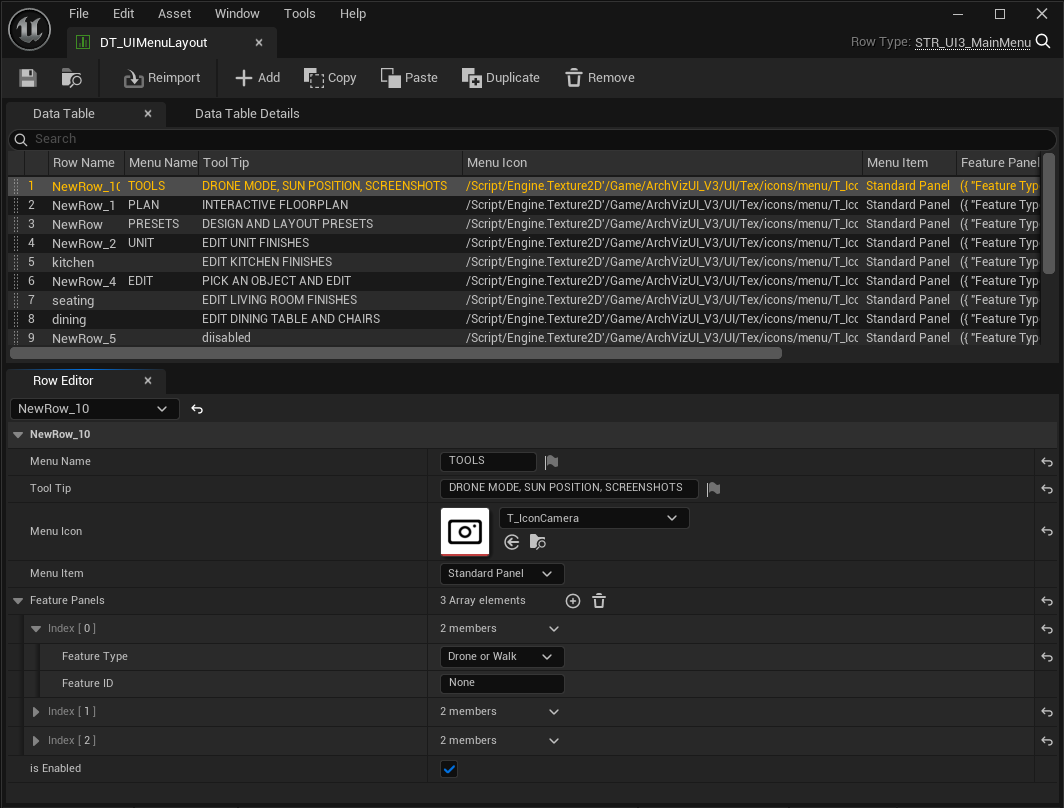
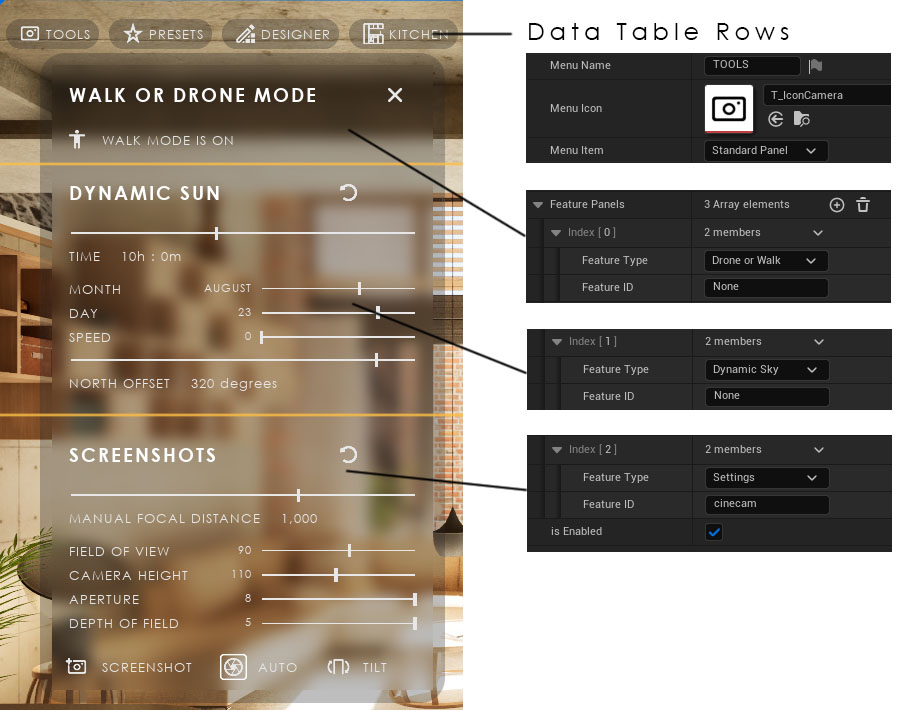
The first row in this data table is for the TOOLS menu. It has three elements added to the Feature Panels array
- DRONE AND WALK MODE is a Button Feature. It can be selected directly from the list of Feature Types.
- DYNAMIC SUN is a Settings Feature. It can also be selected directly as a Feature Type.
- SCREENSHOTS is a Settings Feature. It can be selected directly but it can also be added as Settings with the Feature ID cinecam found in the App Settings data table.
Menu Position
The menu can be placed on top or at the bottom of the screen.Horizontal Panel Position
This is where the first panel is placed. The distance is measured from the left top or bottom corner.
Horizontal Margin
The distance is multiplied by the button ID and then added to the horizontal panel position. The panels will move incrementally to the right. The panels won't move if the value is 0.0.
The panel size and position is calculated from the screen size. This may lead to the panels being off screen or in the wrong position if the level is played in Editor Viewport or New Editor Window. Check it by playing in Standalone Game if this happens.
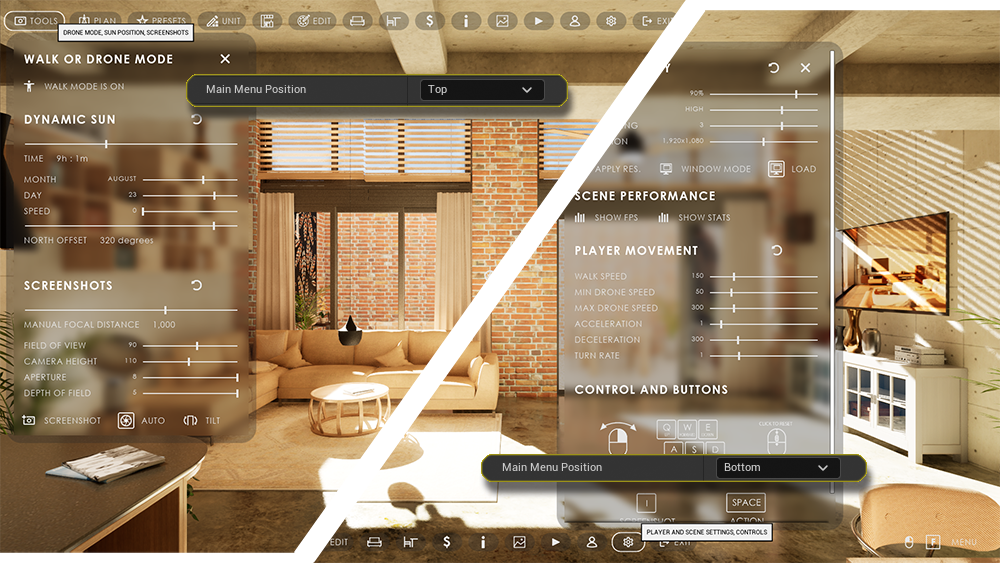
Vertical Panel Position
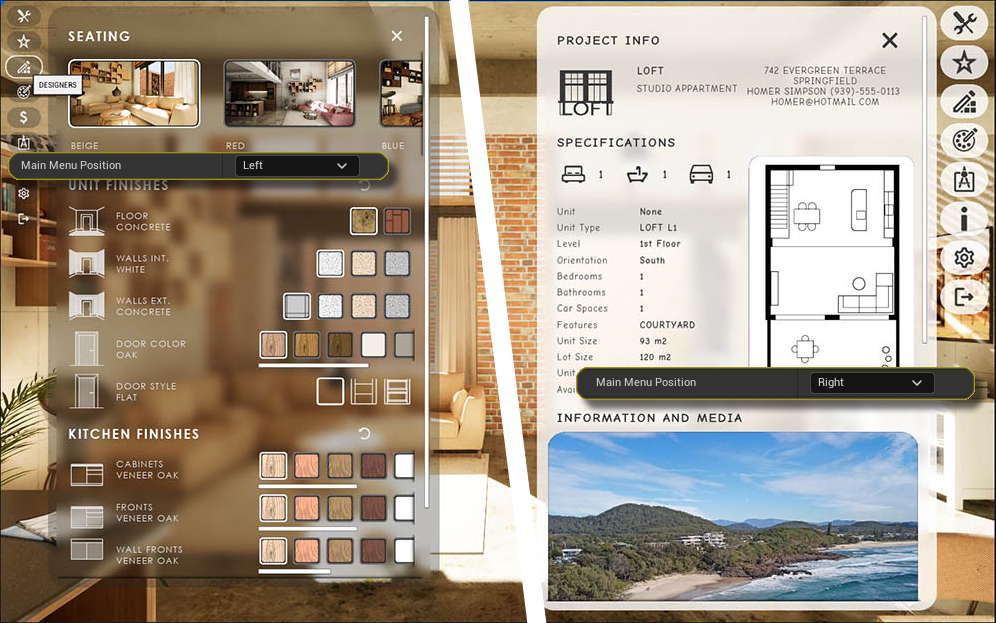
This is where the first panel is placed. The distance is measured from the left or right top corner.
Vertical Margin
The distance is multiplied by the button ID and then added to the vertical panel position. The panels will move incrementall down. The panels won't move if the value is 0.0.
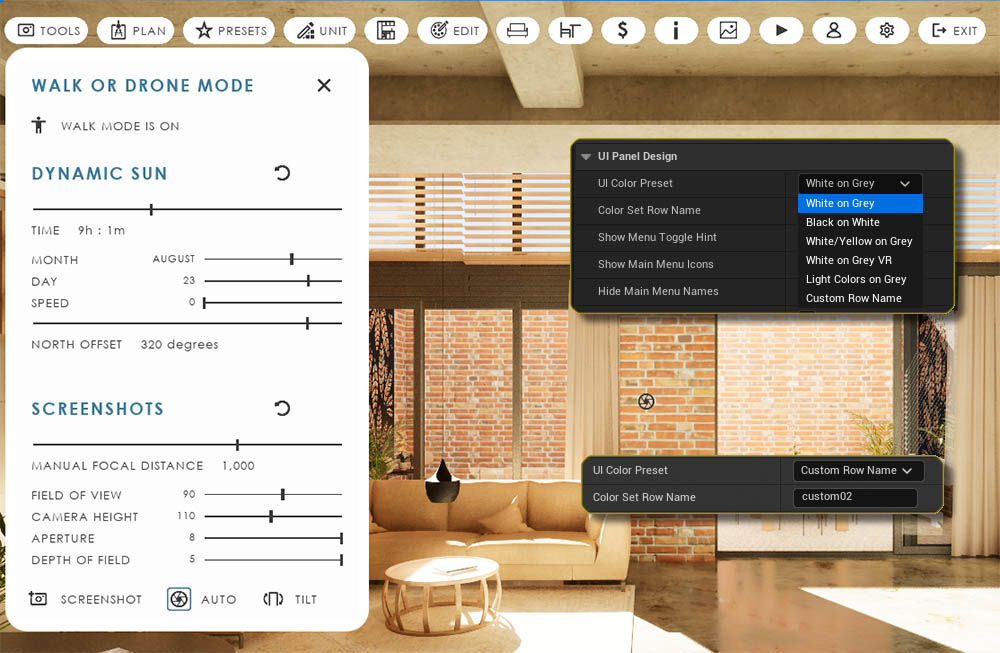
Hide Main Menu Names
All menu names can be hidden in the UI Panel Design section
Panel Design - UI Colors
UI Color Presets
There are a few color presets which can be used from the drop down menu.
- White on Grey is the default.
- White on Grey VR is specially made for use on the virtual tablet with very low brightness
- Light Colors on Grey works well with a gamepad controller. It highlights the menu that is currently in focus.
Custom UI Colors
Custom Row Name enables the use of a custom UI preset. This can be created in the UI Colors Data table which can be found in the Advanced section.
The row name of the custom color set can then be entered as Color Set Row Name.
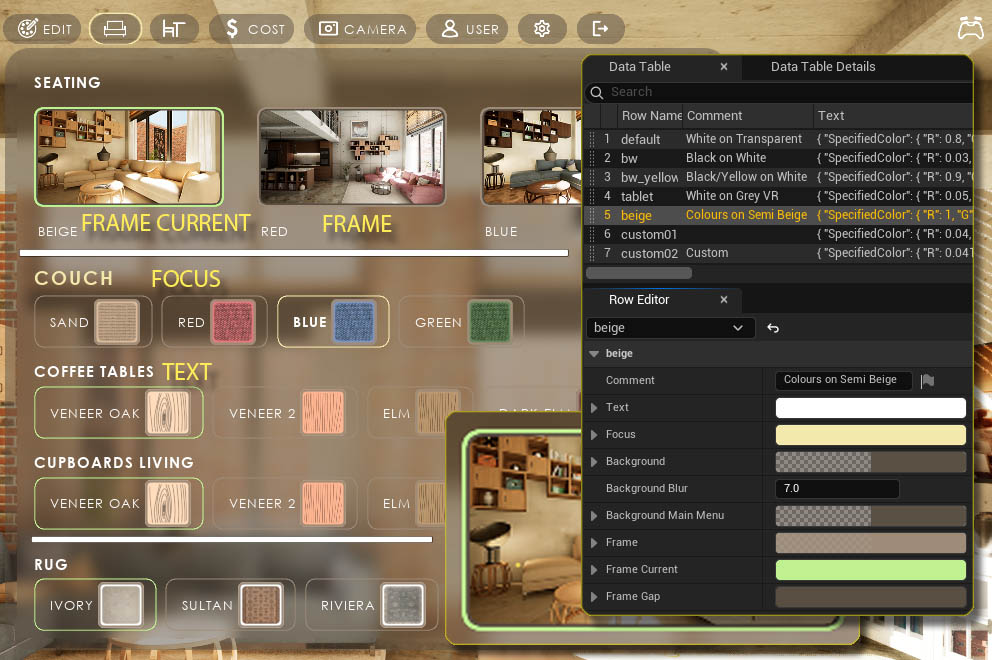
Example
Light Colors on Semi Beige used in the demo level for gamepad (controller) input.
The image should be self explaining for most colors
- Text is for all text in the UI not in Focus.
- Focus is for headers and marker elements highlighting the element in focus.
- Background is for all panels. The main menu button background can be different. Alpha values less than 1.0 make the background transparent.
- Frames have an outer Frame and a Frame Gap between frame and image.
Menu Icons
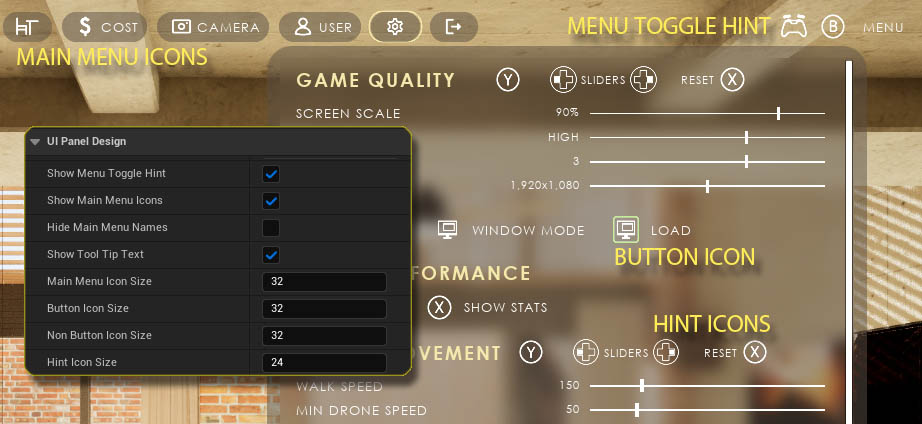
Icon Sizes
- Main Menu Icons are the icons in the main menu buttons
- Button Icons are in buttons in the feature panels
- Hint Icons are the icons that show which button to press on a gamepad or other controller
Show Menu Toggle Hint
The Toggle Hint is either on the right edge of the screen or below the Menu and can be hidden.
Menu Text and Icon visibility
- Main Menu Icons can be hidden if the menu button has a name.
- Main Menu Names cab be hidden if the menu button has an icon.
Menu Icons
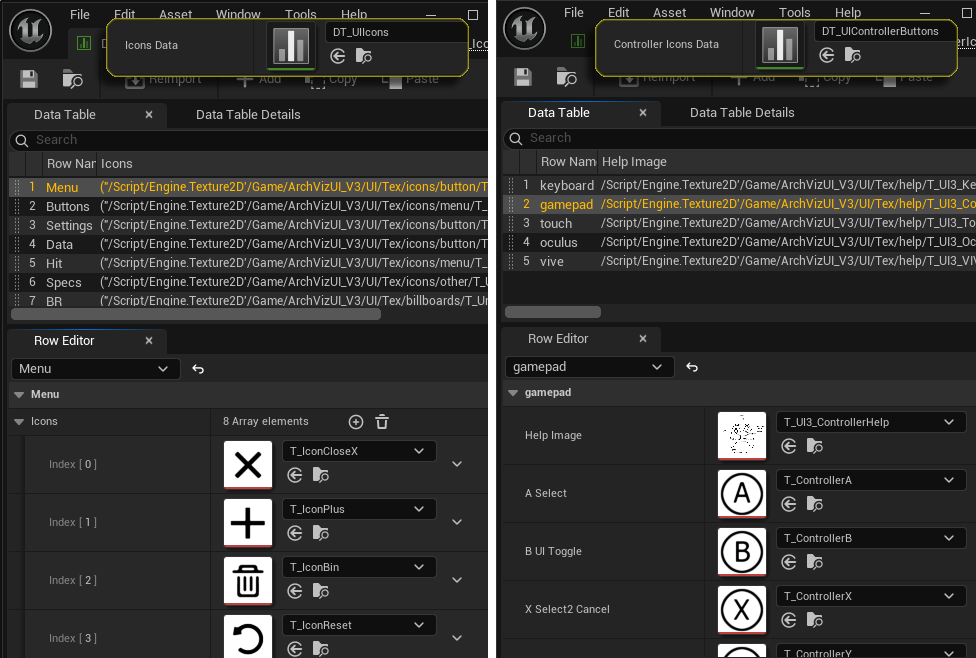
All menu icons live in the Icons Data table assigned in the Acvanced section. They are categorized into 4 groups: Menu, Buttons, Settings, and Data. Hit Icons show in the Edit Mode Widget, Specs and BR icons are for the Unit Info.
Controller Hint Icons
These icons are specific to the input controls and live in the Controller Icons Data table.
Controller Icons Row Name
The row name is set initially from the Intended Use Preset in the General Settings It can be manually changed here for the different VR controllers.
Icons can be replaced in the data table. The UI selects the icon by its ID and row name. Icons can't be deleted and icons can't be added as the UI wouldn't find them anymore.
Text Format
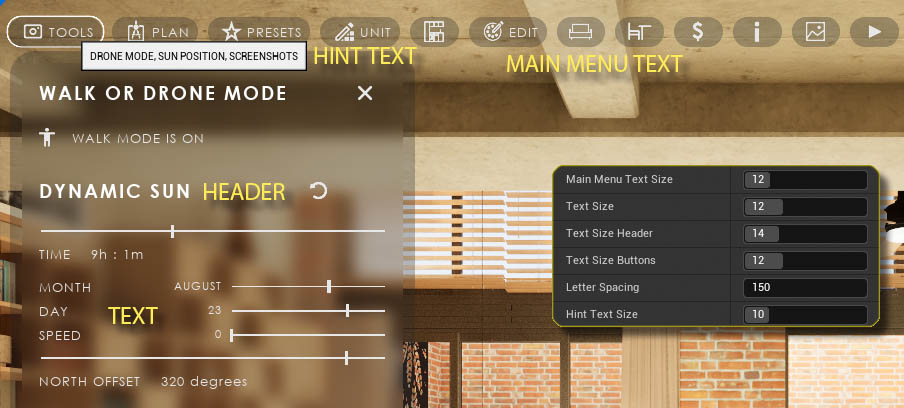
Text Sizes
- Main Menu Text Name of the main menu button
- Text All text not set elsewhere
- Header Widget Headers
- Hint Text Tool Tip text when hovering the menu button
Letter Spacing
Distance between letters in a word. Lower values save space, higher values can make text more readable.
Text Font Family
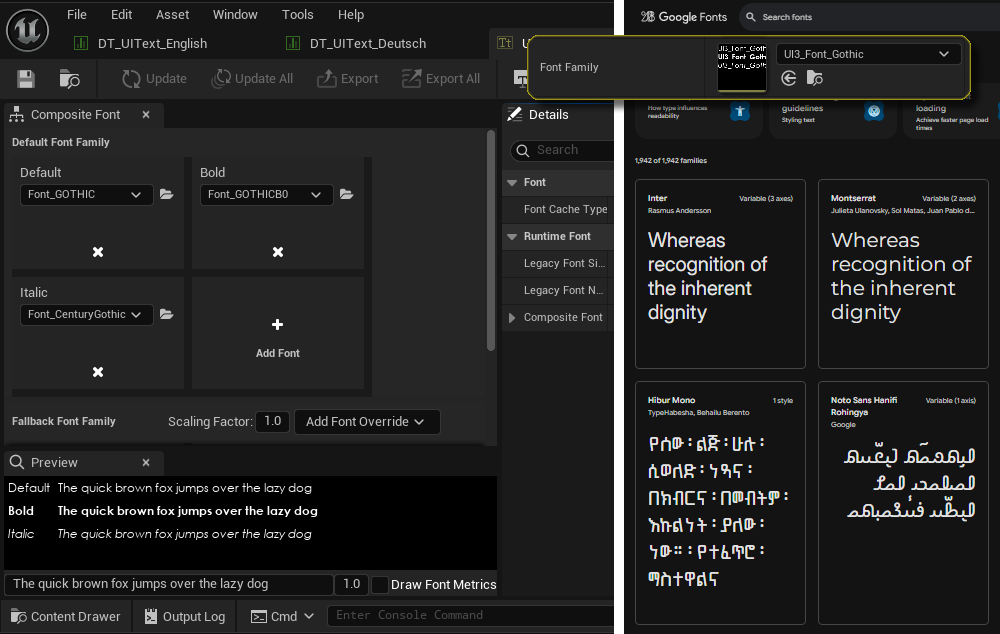
The font set here will affect all text in the UI. There are a few text fonts available in the folder UI / ETC / FONT.
Custom Fonts
Unreal can use other custom fonts. They need to have the following style members
- Default
- Bold
- Italic (currently not used anywhere)
Google Fonts offers many free fonts for many languages. I personally haven't found a way to import fonts that have dynamic sizing and weight. Old school fonts are easy to import.
Text Editing and Translation
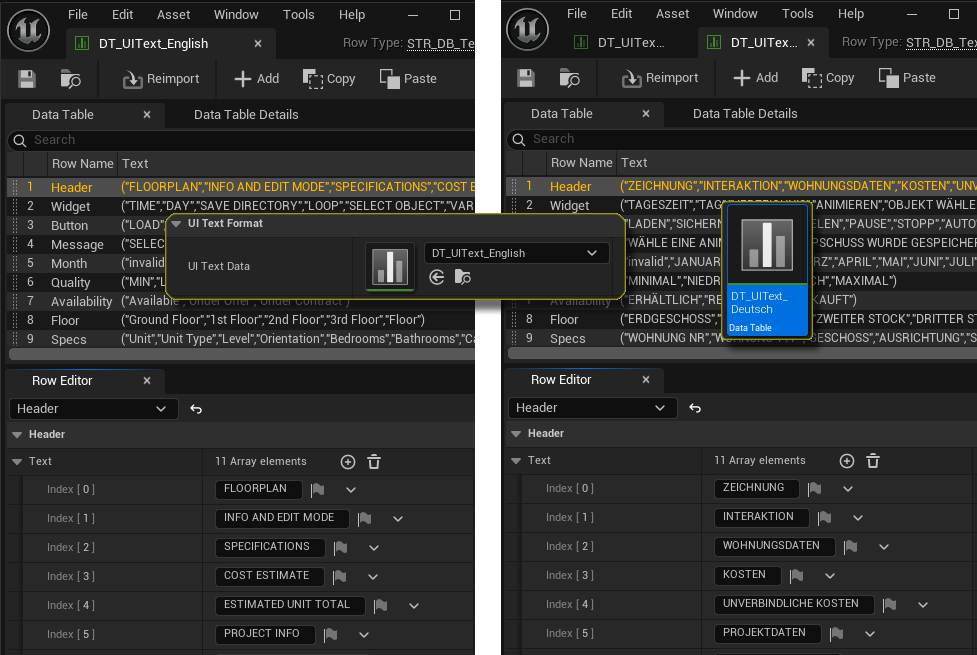
UI Text Data TableText used in the UI is stored in a data table where it can be modified. The data table can be copied and translated into another language and then assigned to the UI.
- Header the Feature Panel Headers
- Widget, Button description text in widgets and buttons
- Message messages displayed in the pop up bar below the menu
- Month, Quality for setting sliders
- Availability, Floor, Specs for the Unit Info widget
- Obsolete not used anymore
The UI uses the row name and ID to find the text. The text can be modified but text elements can't be added, moved or deleted.
 Top of page